Capture sources.
WhichNotes turns them into briefs.
Save links, notes, PDFs, and research fragments without building a system first. WhichNotes synthesizes selected sources into source-backed briefs you can revisit, search, and trace.
Collect sources.
Rewrite summaries.
Lose the evidence.
Generate the brief.
Most note tools help you store information. WhichNotes focuses on the next step: turning selected sources into a clear research brief with the original material still connected.
Search, tags, and graph view still help you navigate. The primary output is a brief you can use for writing, studying, analysis, or decisions.
Most tools
- Choose folders before writing
- Keep tags consistent
- Create links by hand
- Rework structure as notes grow
WhichNotes
- Capture links, notes, PDFs, and audio
- Select the sources for a brief
- AI synthesizes key insights
- Trace the brief back to sources
From scattered sources to a useful brief.
Capture first. Synthesize when you are ready to produce.
Capture research sources
Save a note, paste a link, attach a PDF, or record a thought. No folder system required.
Generate a brief
Select 2-8 ready sources and generate a structured brief with insights, open questions, and next steps.
Trace every source
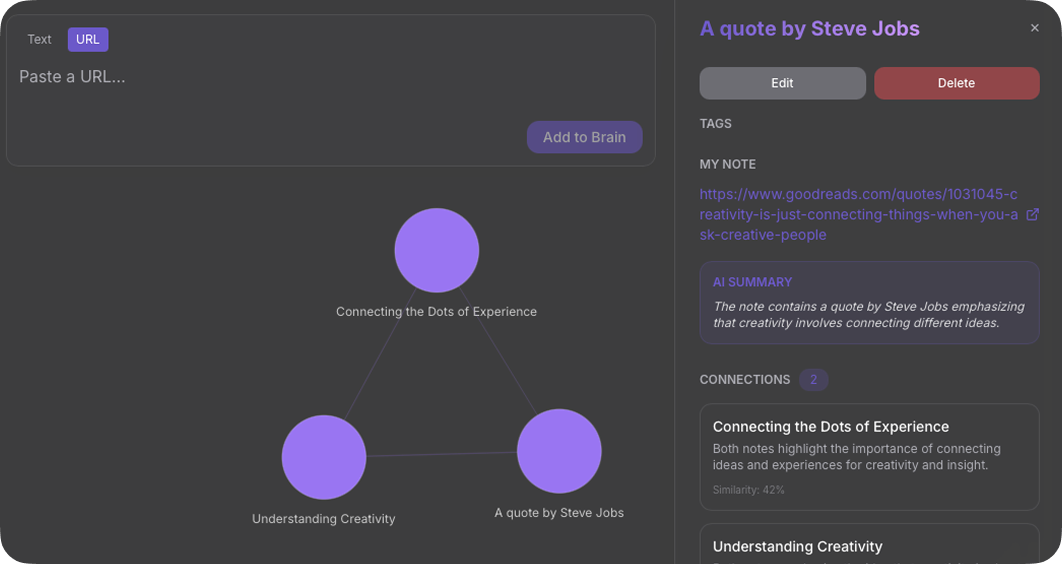
Open the brief as a saved note and use the graph to see which sources shaped the output.
Built for source-backed research output.
Notion, Obsidian, and Roam are powerful. WhichNotes is focused on turning selected sources into a brief you can use, search, and trace back to evidence.
| Capability | Obsidian Local-first, manual links | Notion Workspace and database builder | Roam Research Outliner with backlinks | WhichNotes Sources to briefs |
|---|---|---|---|---|
| Primary workflow | Local files + manual links | Pages, databases, blocks | Outliner + bidirectional links | Sources become briefs |
| Manual linking | Manual-first | Optional | Core workflow | Not required |
| Setup work | System design helps | Workspace setup helps | Structure helps | Start with a note |
| Source-backed briefs | Not native | AI workspace features | Not native | Native on Premium |
| Graph view | Yes | Not graph-first | Yes | Yes |
| Works on day one | After setup | After setup | After learning syntax | Yes |
Obsidian
Local-first, manual links
- Primary workflowLocal files + manual links
- Manual linkingManual-first
- Setup workSystem design helps
- Source-backed briefsNot native
- Graph viewYes
- Works on day oneAfter setup
Notion
Workspace and database builder
- Primary workflowPages, databases, blocks
- Manual linkingOptional
- Setup workWorkspace setup helps
- Source-backed briefsAI workspace features
- Graph viewNot graph-first
- Works on day oneAfter setup
Roam Research
Outliner with backlinks
- Primary workflowOutliner + bidirectional links
- Manual linkingCore workflow
- Setup workStructure helps
- Source-backed briefsNot native
- Graph viewYes
- Works on day oneAfter learning syntax
WhichNotes
Sources to briefs
- Primary workflowSources become briefs
- Manual linkingNot required
- Setup workStart with a note
- Source-backed briefsNative on Premium
- Graph viewYes
- Works on day oneYes
See how sources become briefs.
Capture, synthesize, and trace source connections without leaving the same focused workspace.
Stop collecting only.
Start producing briefs.
Start free. Your first 7 days include Premium, so you can generate source-backed briefs before choosing a plan.
Join WhichNotes free